Instructional Design · Learning Experience Design · Accessible Design
Articulate Suite: Inclusive, Accessible Digital Learning Design
Rise 360 + Storyline 360
Independent professional work · 2026
- Instructional Design
- Learning Experience Design
- Accessible Design
- Authoring Tools
Explore the live projects
Access the Rise course (opens in a new tab) ↗ Access the Storyline toolkit (opens in a new tab) ↗
Both open in a new tab.
Overview
This two-part learning system addresses a gap I kept running into: most resources on digital learning accessibility and inclusion treat them as separate concerns, cover them in isolation from real practice, or are pitched at a single sector. I wanted to build something that brought them together — comprehensively, practically, and in a way that any digital learning practitioner could use, regardless of whether they work in K–12, higher education, nonprofit, or corporate L&D.
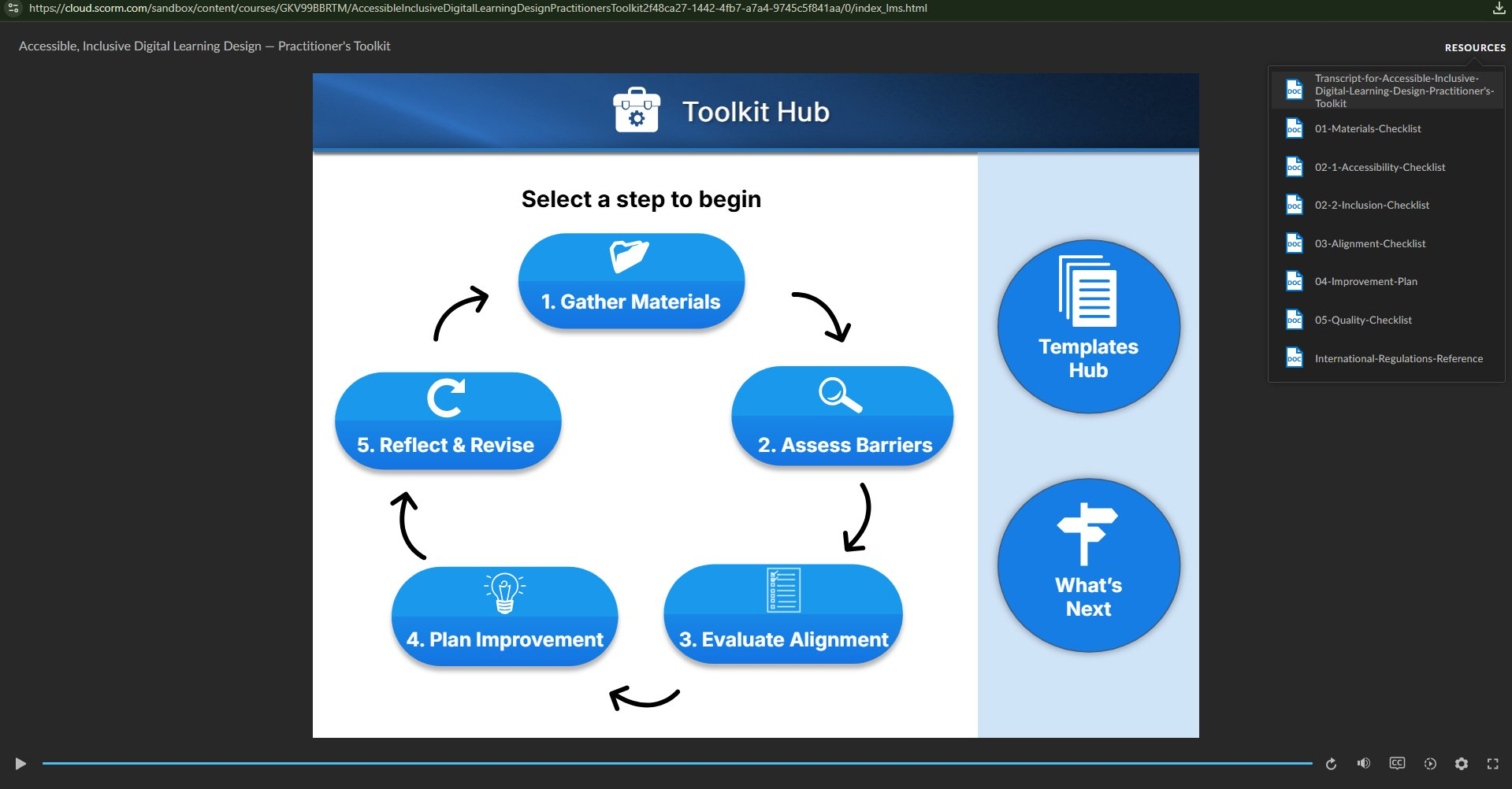
The result is two connected artifacts that serve different but complementary needs. The Rise 360 course — Inclusive, Accessible Digital Learning Design — is an introductory learning experience: seven lessons covering UDL, WCAG 2.1 AA, barrier identification, learning theory, objectives, assessment, and instructional alignment. The Storyline 360 toolkit — The Accessible, Inclusive Digital Learning Design Practitioner’s Toolkit — is a practitioner-facing evaluation and application tool: a five-step framework with six companion template documents for assessing and improving digital learning experiences the practitioner brings to it.
The two are cross-referenced and hyperlinked — Lesson 7 of the Rise course introduces and links to the toolkit; the toolkit references the course for learners who want a more conventional, foundational grounding before applying the framework. Each can stand alone. Together, they form a learning pathway from introduction through to active practice.
The design problem
Accessibility and inclusion are frequently siloed — addressed in separate trainings, separate checklists, separate professional communities. For practitioners without a specialist background, the combined landscape can feel fragmented and hard to translate into action. I wanted to design a resource that integrated both, grounded them in practical criteria and tools, and was genuinely usable by someone working in any digital learning context — not a niche resource built for a particular sector or tool set.
Audience
Anyone designing, building, or improving digital learning experiences who wants practical guidance on making them more accessible and inclusive, regardless of sector, role, or prior training in this area. The Rise course is pitched at practitioners who are new to the topic; the Storyline toolkit assumes some practice experience and is designed for active use alongside real projects.
Key design decisions
The most consequential design decisions weren’t about content — they were about the artifacts themselves.
Both projects are built to be accessible and inclusive, not just to teach about those principles. That distinction mattered at every stage. Where Articulate’s native features — animations, timestamped content appearance, dynamic object states — created barriers for screen reader users, keyboard-only navigation, or managing cognitive load, I weighed the trade-off explicitly and prioritized access over aesthetics. That meant accepting a less visually dynamic product in places — a choice that is, of course, the central argument of both projects.
Specific decisions included:
- Fixed four-button navigation architecture in Storyline (Toolkit Hub · Template Hub · Current Step · Next Step) for predictability and consistent keyboard accessibility throughout
- Per-slide timeline-synced narration with T-button transcripts in Storyline, supporting screen reader users and those who prefer or require text alternatives
- AI-generated voiceover for lesson introductions in Rise only — where it added orientation value without compromising comprehension or pacing elsewhere
- A two-track barrier taxonomy — five accessibility barriers, five inclusion barriers — that structured the evaluation framework clearly without conflating two related but distinct categories
Terminology, examples, and frameworks were chosen to be broadly applicable across educational, nonprofit, and corporate contexts wherever possible. The toolkit, in particular, was designed for practitioners to bring their own digital learning experience to it — rather than working through pre-set examples — which keeps it genuinely transferable.
Evaluation
Both projects include dedicated feedback forms — built in Google Forms — covering learner experience, content clarity, accessibility, and inclusion of the artifact itself, and perceived usefulness. Embedding evaluation from the outset reflects a design-cycle orientation: feedback is structured to surface data that directly informs iteration rather than being treated as an optional add-on.
Both forms also include questions about the cross-project relationship — whether Rise completers go on to use the toolkit, whether toolkit users found the course a useful foundation, and how users experience the integration between the two. For a learning system built around a deliberate pathway, evaluation at the join point matters as much as evaluation of either piece individually.
Feedback from users is actively welcomed — links to both forms are embedded within each project.
The feedback loop reaches beyond those forms: the suite is published openly and has been shared for use and feedback with the wider digital learning community — both on LinkedIn and within the Digital Learning Institute practitioner community — inviting honest critique from practitioners across sectors.
Inside the projects
Rise 360 — Inclusive, Accessible Digital Learning Design. Seven lessons moving from foundational concepts through to design application: UDL principles, WCAG 2.1 AA standards, barrier identification, learning theory, writing objectives, assessment design, and instructional alignment. Interactive activities — including branching scenarios and knowledge checks — support engagement, retention, and application at each stage. The six companion template documents from the toolkit are incorporated into the course as well, so learners can begin applying what each lesson covers to their own work rather than waiting until they reach the toolkit.
Storyline 360 — The Accessible, Inclusive Digital Learning Design Practitioner’s Toolkit. A five-step evaluation and improvement framework supported by six companion template documents. Rather than teaching about accessibility and inclusion in the abstract, the toolkit gives practitioners a structured process for assessing a real digital learning experience they are working on — and the templates to document and act on their findings.
Deployment and LMS readiness
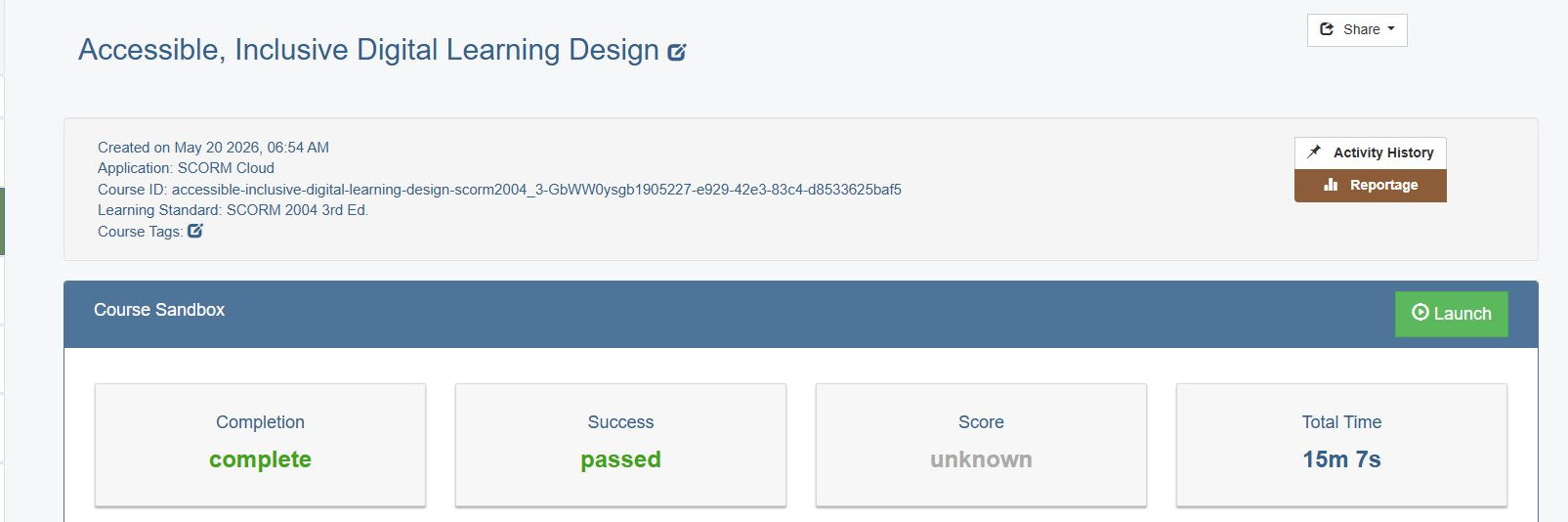
Both the Rise course and the Storyline toolkit were published as SCORM packages and deployed and tested in a live LMS environment — verified on SCORM Cloud and MoodleCloud — alongside the web versions linked above. Testing confirmed correct launch, completion, and pass/fail reporting, score tracking, and resume/bookmarking behavior across attempts.
The web builds linked at the top are the quickest way to explore the experience. The SCORM packages are the proof that each piece is standards-compliant and ready to drop into an institutional LMS with tracking intact — the full path from authoring to a deployable, reportable course, not just a hosted web page.
Reflection
These are finished projects — but not projects I’ve stopped thinking about. My trial subscription expired before I could make refinements I’d already identified, and being specific about them is more useful than a general caveat.
In the Rise course: the branching scenarios are functional but too general to be as engaging or challenging as the content warrants. Given another pass, I’d make them more contextually embedded — specific to the barrier types being covered in each lesson, with higher stakes in the decision points. I’d also bring links and instructions for specific accessibility evaluation tools directly into the relevant lesson content, rather than leaving them only in the companion template document.
Incorporating the toolkit’s template documents into the course was, I think, the right call — it lets learners start applying the ideas to their own work immediately rather than waiting until they reach the toolkit. But those templates were designed for the toolkit’s audience, who bring some practice experience, so a learner newer to this work might not feel as prepared to use them well. I don’t regret offering them. With more time, though, I’d have tailored a Rise-specific version — simpler templates, or clearer scaffolding and worked instructions — so the support met these learners where they actually are.
In the Storyline toolkit: object and button placement across screens was not as systematically consistent as I’d want in a professional deliverable — a consequence of building iteratively under time constraints. The opening title screen narration specifies the location of the transcript button and Resources tab, but that level of navigational specificity isn’t carried consistently through subsequent screens. Greater consistency across the full build is something I’d address in a revision. The feature I’d most want to add is a dual-mode path: a free-exploration route alongside a guided route that lets users track or check off their progress through each step and template — without restricting non-linear use. It was the right idea for the toolkit’s purpose, but too ambitious for the trial window.
Tools: Articulate Rise 360 · Articulate Storyline 360 · Google Docs (companion templates) · Google Forms (evaluation)
Context: Independent professional work developed following completion of the Professional Diploma in Digital Learning Design and Instructional Design — Awarded with Distinction (Digital Learning Institute, 2026). Published and open for feedback.